Summary
Hotspot App is a Progressive Web App (PWA) built with React, Express and SCSS for Karlstad University’s annual job fair. I developed a digital solution that consolidates essential details into one intuitive platform, helping students find suitable employers. This case study details my journey through the development, challenges, and lessons learned.
Background
Hotspot is an organization that hosts Sweden's largest annual job fair at Karlstad University (KAU). Founded by students in 1998, this 5.5-hour event has consistently attracted over 130 companies and more than 8000 student visitors each year. During my studies, I joined the Hotspot team in 2023-2024, to build the team’s first ever app development project in 70 days. This digital solution is to support matching of students and companies at the job fair.
Understanding The Problem
The existing experience relied on disconnected resources to connect students with companies. The team had to distribute physical badges and printed maps through the information desk, which many participants missed, and an online catalogue that was difficult to discover and cumbersome to browse. The student-led organizing team found it challenging to manage operational workload during the event, and balance event planning alongside their studies.
Students encountered these two challenges: they lacked an accessible way to discover relevant companies, and navigating between resources during the fair made it difficult to plan where to go. Companies, especially those further from the main venue, struggled with visibility and reaching suitable students. With over 130 companies competing for students’ limited time, students needed a way to quickly assess relevance and prioritize where to go.
| Students | Companies | Hotspot Team |
|---|---|---|
| Difficulty finding relevant companies within the limited time frame | Difficulty attracting the right students within the limited time frame | Balancing studies and operational workload of the event |
Summary of the pain points
Before development began, we used insights from previous job fairs and an entrepreneurial case study conducted by KAU Business students, to identify key pain points and guide our design and technical decisions. These insights shaped Hotspot around centralizing company information, reducing discovery friction, and supporting faster decision-making.
Goal
The Hotspot team’s goal was to launch an app that improves matching between students and companies for the job fair while reducing operational workload on the team.
By improving these matches, students can connect with companies that better align with their interests, while helping companies reach more relevant candidates and maximize their visibility at the event.
Objectives
- Streamline company discovery process for students.
- Reduce the time it takes to find relevant company information.
- Reduce operational workload for the team.
Design and Development Process
I led the Hotspot app’s development alongside one developer and one designer, with frequent pair programming sessions. We worked closely with the event project manager on planning, the marketing team on app publicity, and KAU's IT consultant on Podio API integration and deployment.
Our priority was to ensure that we had a working app two weeks before the event day. We focused on building core features that are essential to achieving the app’s goals, and set milestones to help us stay on track of the deadlines.
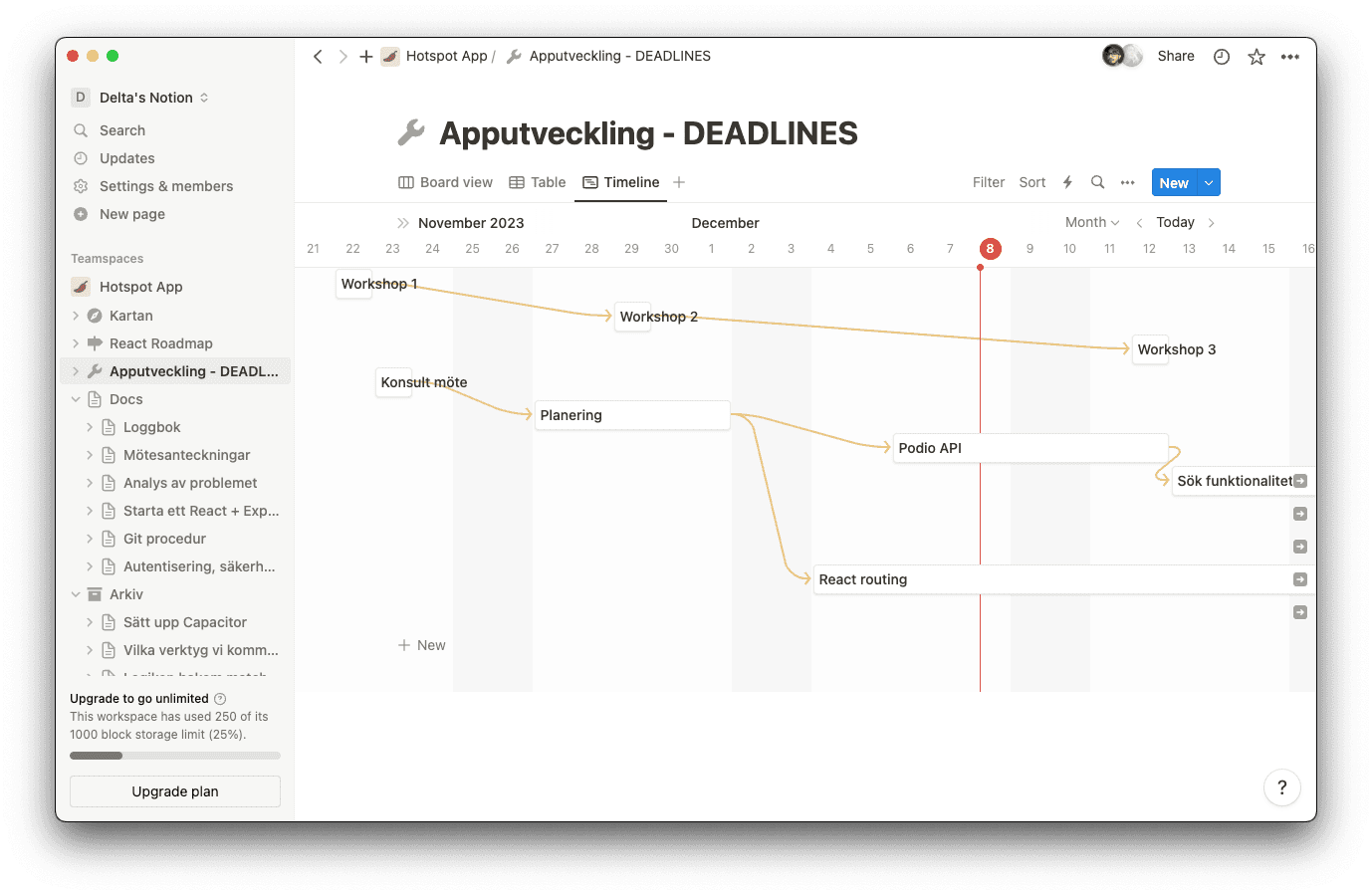
Github— Used for version control, and set up standardized procedures for naming, documentation, and code practices.Notion— Used for tracking progress, meetings, app development, and documentation for future Hotspot Devs.Podio— Used for integration and management by the rest of Hotspot team
Research and Development
We began with three product discovery workshops where we aligned the app’s goals and scope, defined features and drew concept sketches. The designer focused on research and prototyping, while the developer (Dev) team explored technical options and selected the app framework. After finalizing the designs, we developed and tested the prototype with the Hotspot team before deploying the app.
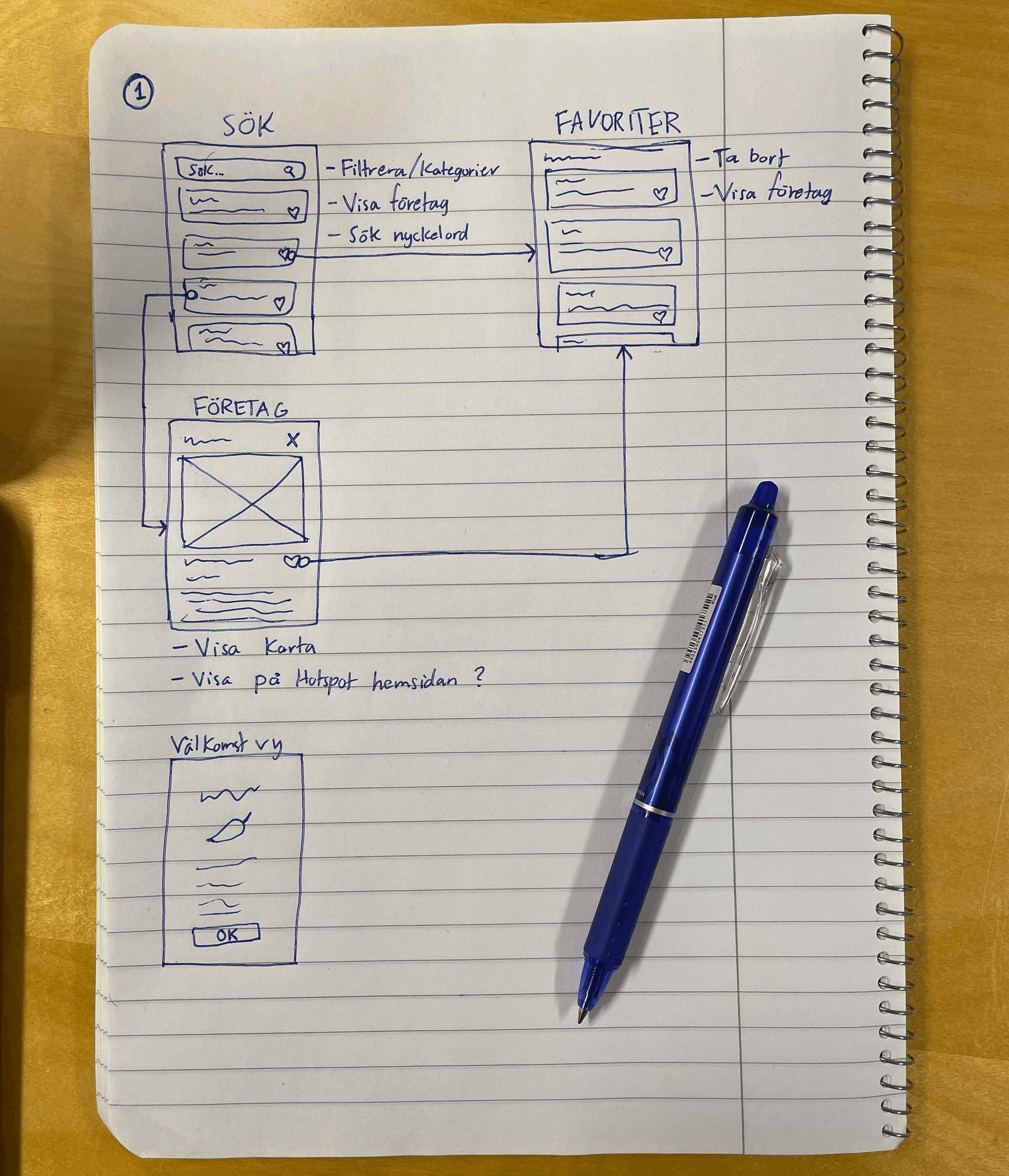
UI/UX Design
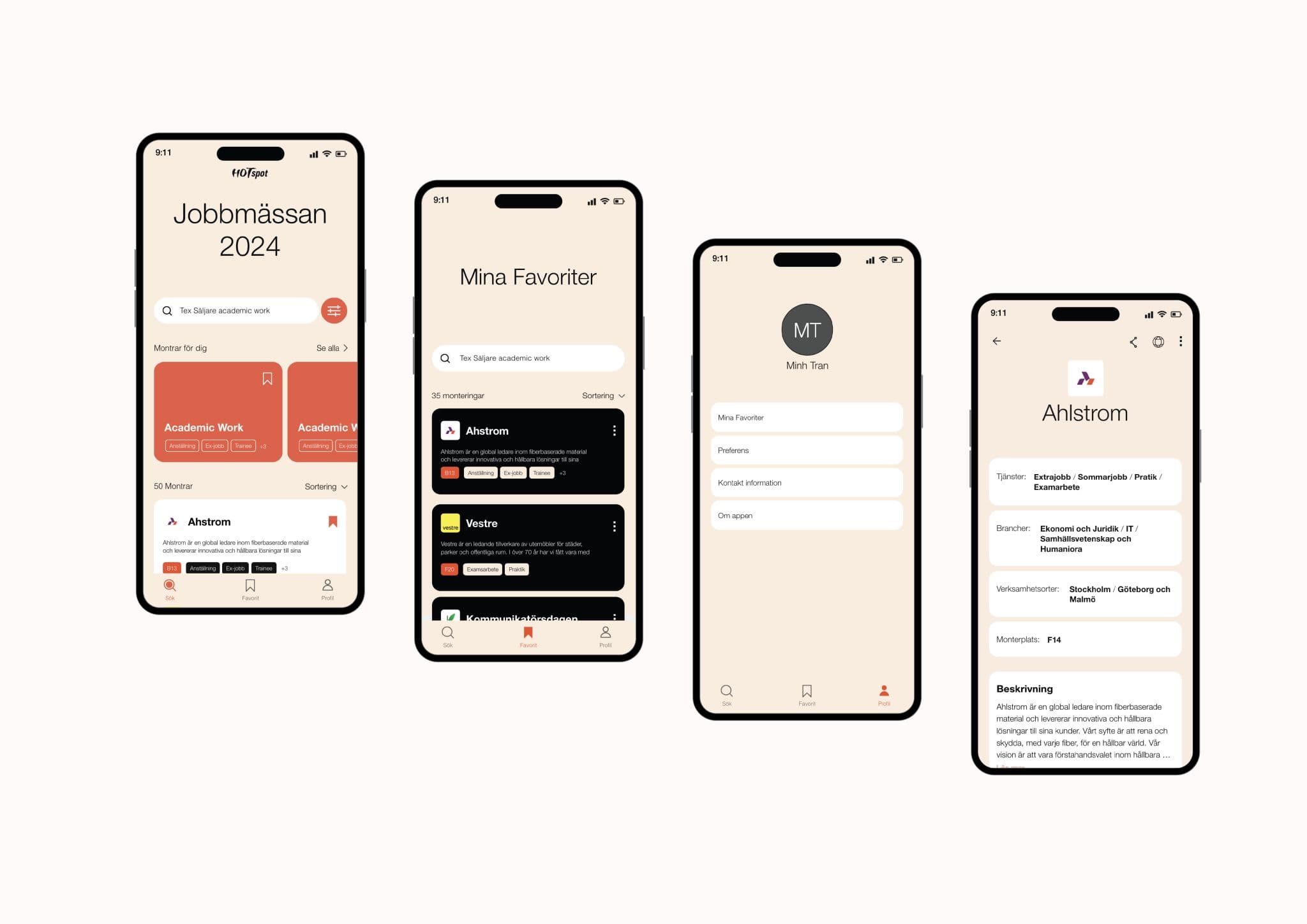
Technical feasibility was validated alongside our designer, with Hotspot team’s feedback shaping the final design.
Technology Considerations
We experimented with various technologies, including Capacitor with Ionic and Expo for React Native (for native-like features on mobile), but ultimately landed on the tech stack below.
Tech Stack
React — Front-end
Chosen for its flexibility and future-proofing of the app. Easier to get started due to familiarity.
Express — Back-end and server-side
Chosen for its simplicity and lightweight architecture to quickly integrate with Podio API and run scheduled updates.
Podio API — Project management API integration
For syncing company data while preserving the Hotspot team's existing workflow.
JSON — Local database
For consolidating data from multiple sources into a single local database with scheduled updates.
SCSS — Styling & design system
For easier development and maintenance of design code in the future, enabling us to implement our own design system which we used across the entire app.
Our decisions were based on these criteria:
| # | Criteria | Explanation |
|---|---|---|
| 1 | Ease of use | Developer-friendly framework |
| 2 | Learning curve | Minimal learning curve for quicker development |
| 3 | Maintainability | Easily maintainable for future developers |
| 4 | Modularity | Modular and expandable, having both scalabilty and flexibility in mind |
| 5 | Resource usage | Efficient in battery, bandwidth, and overall performance |
| 6 | Device support | Consistent performance and predictable behavior across iOS, Android, and other devices |
Building the Solution
Understanding Key Data Points
To understand the range of opportunities available for students, we consolidated what companies offered:
Types of Industries
- Economics and law
- Healthcare & Social Work
- Engineering
- IT
- Teacher Training
- Music, Dance & Culture
- Social Science & Humanities
Types of Roles
- Employment
- Trainee
- Extra Job
- Thesis Work
- Summer Job
- Internship
- Membership
Other important data points include:
- Company addresses
- Event booth locations
- Additional information companies provided
These points shaped the core functionality of the Hotspot app, to directly address the root problems and help students find the right companies.
Core Features: Essential functionality required to achieve the app's goals.
- Display list of companies
- Detailed view of company information
- Search company information
- Filter company information
- Save companies in a Favorites list
- Local user profile (for personalized recommendations)
Ideal Features: Desirable functionality that enhances the app but not strictly necessary.
- Sort company information
- Cloud student and company profiles (requires database)
- Log in and authentication (requires database)
- Single Sign-On (SSO) for university students
- Push Notifications
- UI animations and micro-interactions
- Mobile-native modals and popups
- Option to download on App Store or Play Store
- Google Analytics
Key Features and Functionality
The Hotspot app offers features designed to streamline the job fair experience for both students and companies.
Instant Access — Anywhere
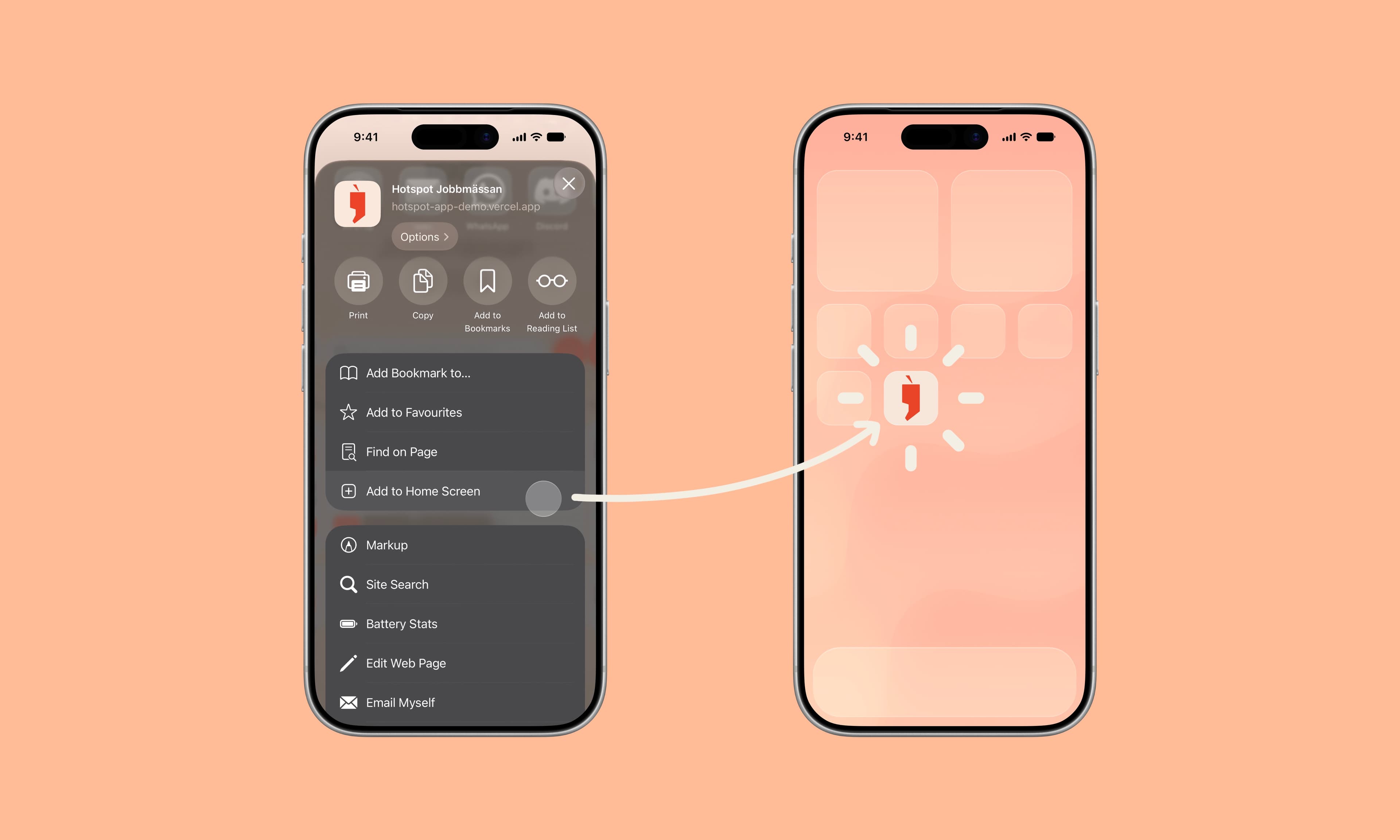
Built as a PWA, Hotspot provides instant access with no installation. Users can launch it from any device with a modern browser or save it to their home screen for quick access, making it convenient to find event information throughout the 5.5-hour career fair.
How we let users save the app to their home screen
// manifest.json
{
  "short_name": "Hotspot",
  "name": "Hotspot Jobbmässan",
  "icons": [{
    "src": "HotspotAppLogo_64.png",
    "sizes": "64x64 32x32 24x24 16x16",
    "type": "image/x-icon"
    }, {...}, {...}],
  "start_url": ".",
  "display": "standalone",
  "theme_color": "#000000",
  "background_color": "#ffffff"
}
Find Anything — Instantly
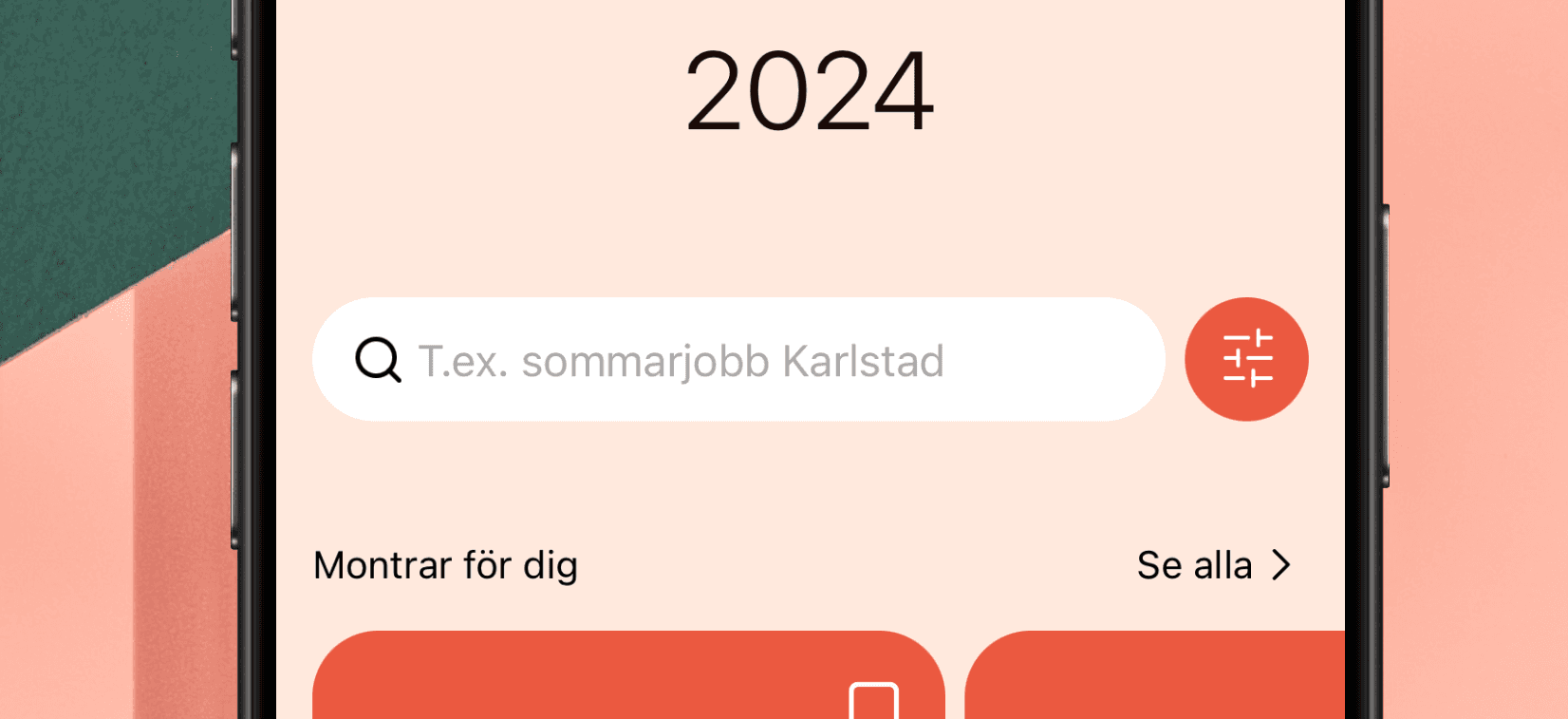
Search across company names, descriptions, tags, and booth IDs with results updating in real time as users type. Combine this with filters for industry and role, plus multiple sorting options, to quickly find relevant companies.
How we implemented Search
Company data was indexed locally for full-text search. React's useEffect hook filters cached data on each input change, providing instant search results.
 useEffect(() => {
  if (query === '') {
    setSearchData(filteredData);
  } else {
      const searchResult = filteredData.filter(item => {
      const values = Object.values(item);
      for (let i = 0; i < values.length-1; i++) {
        if (values[i].toLowerCase().includes(query.toLowerCase())) {
          return true;
        }
      }
      return false;
    });
    setSearchData(searchResult);
  }
}, [query, data, filteredData]);
How we implemented Filters
Predefined company categories were converted into selectable tags. React state management handles user selections, allowing multiple filters to be applied simultaneously.
const updateFilter = (Roles = [], Industries = []) => {
  const roleTags = roles.map(tag => tag.toLowerCase());
  const industryTags = industries.map(tag => tag.toLowerCase());
  setFilterQuery([roleTags, industryTags]);
};
How we integrated with Podio API
Our Express back-end uses Axios to integrate with Podio API and run scheduled jobs using scheduleJob() to keep data up to date. Our IT consultant opened a Podio API endpoint to help us connect the app.
axios
  .post(authenticationURL, authenticationBody, authenticationHeader)
  .then((response) => { accessToken = response.data.access_token; })
  .catch((error) => { console.log(error); }
);

async function fetchDataAndSave() {
  const url = "...";
  try {
    const response = await axios.get(url);
    const data = response.data;

    fs.writeFile(...);
  } catch (error) {
    ...
  }
}
schedule.scheduleJob("0 3 * * *", fetchDataAndSave);
Recommendations — Personalized
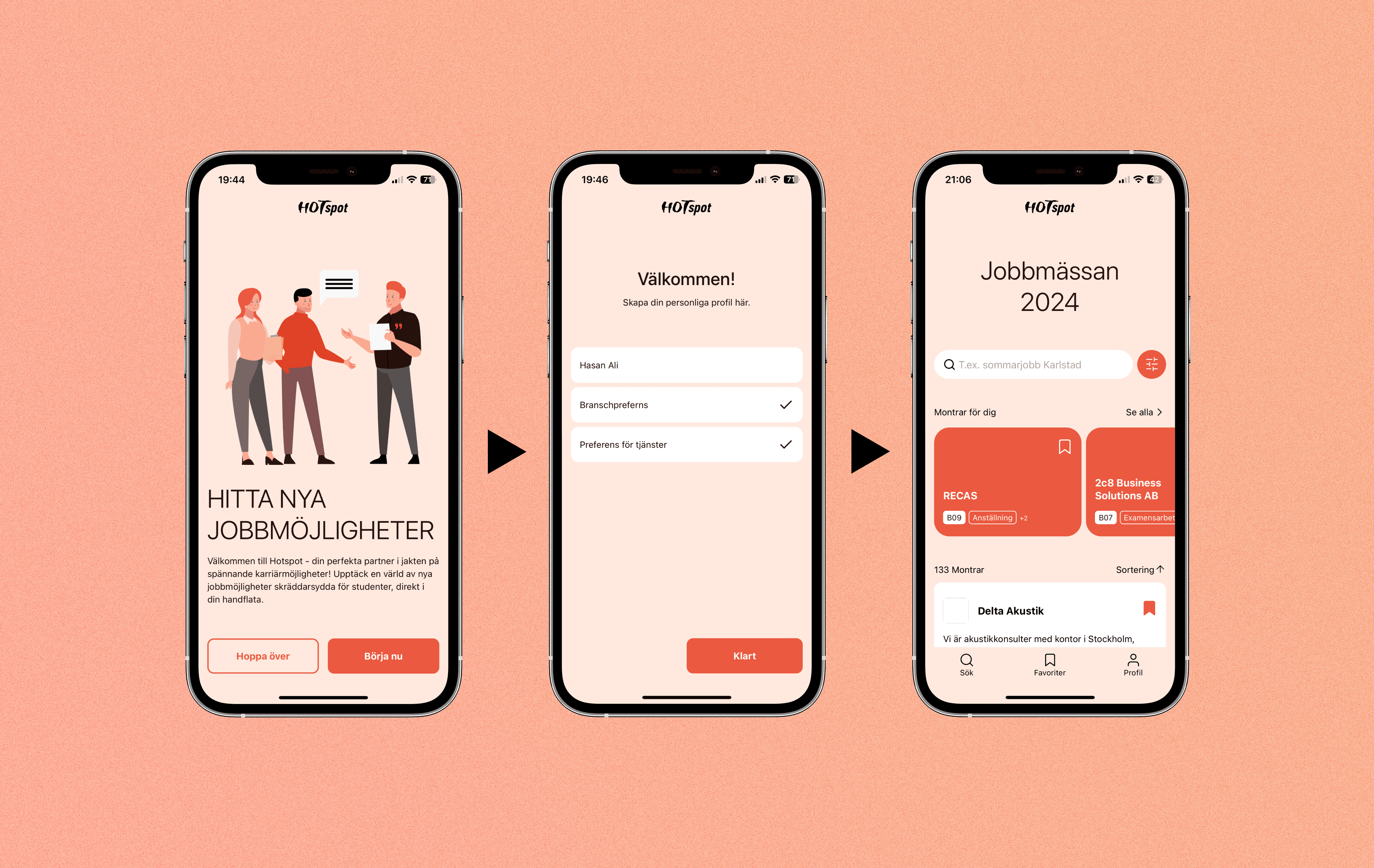
A streamlined onboarding flow captures users' interests, creating a local profile to personalize company recommendations, making it easier for students to discover relevant employers and for companies to reach the right audience.
How we implemented Recommendations
The user’s selected preferences formed a local profile, turning existing Filter logic into a more personalised discovery experience.
const industryMatch = isIndustryFilterActive
  ? industries.some(tag => profileData.industries.includes(tag))
  : false;

const roleMatch = isRoleFilterActive
  ? roles.some(tag => profileData.roles.includes(tag))
  : false;

if (isIndustryFilterActive && isRoleFilterActive) {
  return industryMatch && roleMatch;
} else if (isIndustryFilterActive) {
  return industryMatch;
} else if (isRoleFilterActive) {
  return serviceMatch;
}
Information at a Glance
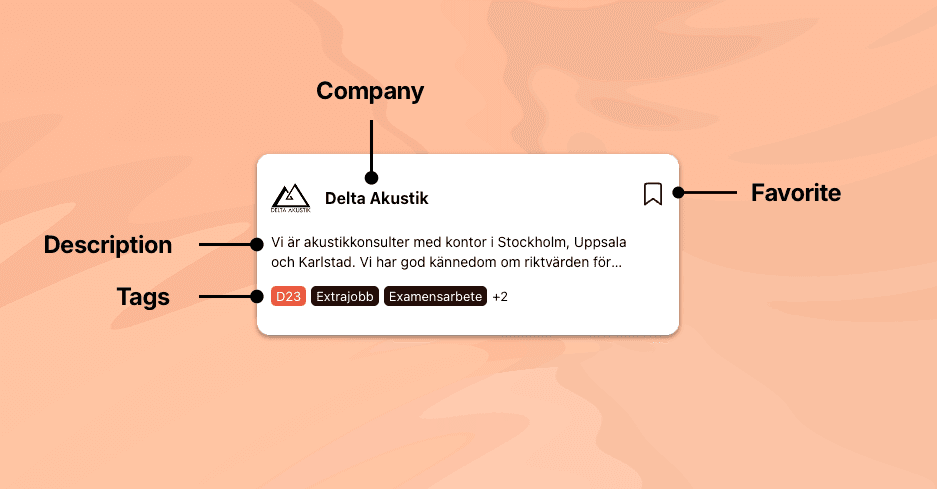
Company cards consolidate essential information into a concise, glanceable format, helping students quickly browse and prioritize across over 130 companies, arrive prepared, and focus conversations on opportunities rather than introductions.
Favorites — In One Place

Students can save companies into a personal Favorites list and revisit them any time. The list retains the same search and filtering capabilities as the main directory, allowing students to refine their selections while planning their career fair experience.
How we implemented Favorites
const [favorites, setFavorites] = useState(() => {
  const savedFavorites = localStorage.getItem('favorites');
  return savedFavorites ? JSON.parse(savedFavorites) : [];
});

const addToFavorites = (item) => {
  setFavorites((prevFavorites) => {
    // Check for duplicates
    if (prevFavorites.some(fav => fav.Boothid === item.Boothid)) {
      return prevFavorites.filter(fav => fav.Boothid !== item.Boothid);
    } else {
      return [...prevFavorites, item];
    }
  });
}
Testing
We set an initial deadline for the app to be ready for testing. Early tests within the Hotspot team revealed a few issues. The team was asked to submit bug reports including:
- The device and browser used.
- Steps to reproduce the bug.
- Screenshots and additional context.
Summary of the bugs:
| Bug | Affected Users | User Impact | Priority |
|---|---|---|---|
| Unresponsive search input on iOS devices. | All iOS users | High | High |
| Viewing Favorites tab caused the page to crash | 2 | Medium | High |
| Users could scroll the main page even when the company modal was open | All users | Low | Low |
As launch approached, we balanced bug fixing with production readiness. We resolved outstanding bugs and investigated the crash affecting the Favorites page. Unable to reproduce it, we suspected it was caused by a memory leak. Given the approaching launch and competing priorities, we implemented a temporary workaround by prompting users to reload the page, and documented the issue for future investigation.
Launch
We launched the application on schedule. KAU’s IT consultant assisted us in deploying the application, as we do not have access to internal servers.
Challenges
As the pioneering Dev team, we worked without prior documentation or technical handover, a technical manager, and with one developer temporarily unavailable. With limited resources and a fixed event deadline, we prioritized simple, reliable solutions that met core requirements, making deliberate trade-offs essential to launching the app successfully.
Technical Challenges
- JavaScript Stability: JavaScript’s dynamic nature caused unexpected bugs. We addressed these by explicitly defining data types and tracing the data lifecycle.
- API Rate Limits: Frequent server requests could have resulted in thousands of API calls. We reduced this by having the backend handle server communication and serve data to the frontend through a single request.
- Frontend-Backend Communication: Mismatched file paths prevented the frontend from accessing backend files. We resolved this by correctly configuring the paths.
- App Launch: As our first real-world project, launching the app introduced challenges beyond development. We familiarized ourselves with production code, configure the app, and ensured stability for deployment.
Outcome
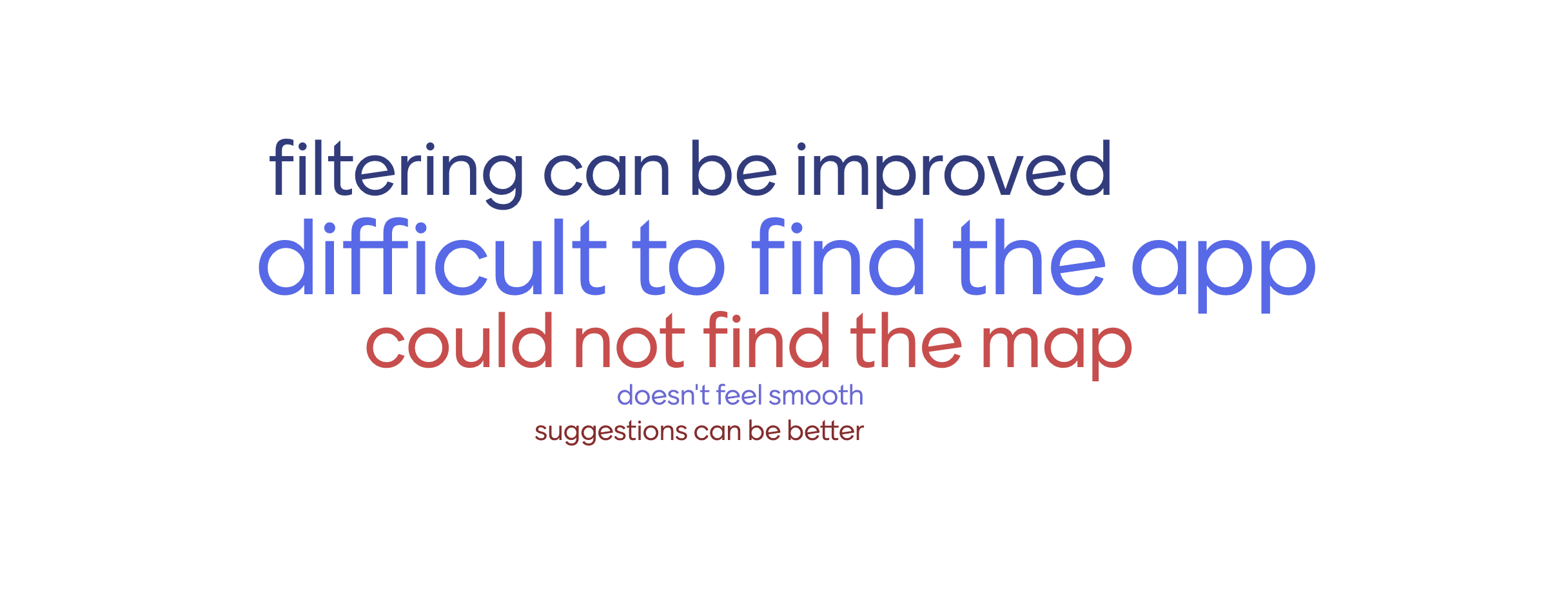
The Hotspot team gathered qualitative feedback through participant surveys. Students were asked "This year we launched the 'Hotspot app', did you use it?" and "How did you find the app?". I translated the Swedish responses to English, analyzed the data using cluster analysis to identify key themes, and presented them as word clouds below.
The app received an overall adoption rate of 20% according to the survey data, where 75% reported positive experience using the app. Highlighted responses include:
"It was easy to use the app and find information about the exhibitors."
"Good that you could see which areas the different exhibitors were targeting and where they were at the fair."
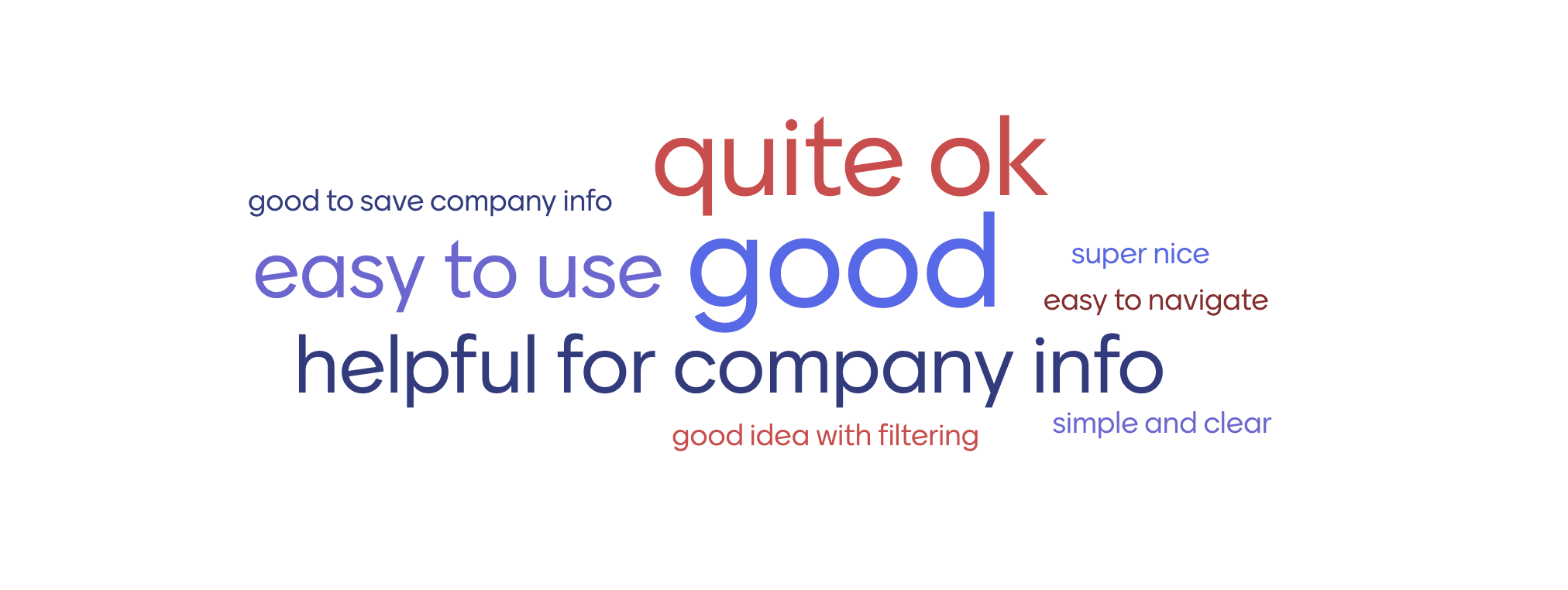
The gathered sentiments also surfaced these areas for improvement: students hoped to have more filtering options and personalized recommendations, and an easily accessible map.
Company data was not available for this analysis, so their experience could not be assessed.
The app provided a digital alternative for accessing event map and information intended to support event operations and reduce the team’s reliance on physical materials. However, as part of the transition, the team continued using printed maps alongside the app during the event. While the app was perceived as helpful, its impact on operational workload could not be clearly determined in this iteration.
Conclusion
Key Insights
1. Limited User Reach and Discoverability Challenges
The app had limited reach, with only 20% of surveyed students reporting that they had used it. Among users, more than half of the negative feedback related to access rather than functionality: students had difficulty finding the app, were unaware of its existence, or assumed it required installation, despite it being accessible directly through a web browser. These findings suggest that discoverability and communication may have been barriers to adoption among those who encountered the app. However, as the data was only collected from students who used the app, the reasons why the remaining students did not adopt it cannot be determined. Further research could therefore involve observing and interviewing non-users to understand how they navigate and experience the career fair, and whether the app could better support their needs.
2. Demand for Greater Personalization and Seamless Navigation
Around 10% of students expressed interest in more filtering options, better personalized recommendations, and an easily accessible event map. Although the specific filtering preferences were not captured, this feedback suggests opportunity for further improvements. More advanced filters were not implemented during the project due to the need for additional data cleaning within the limited development time frame. Similarly, the recommendation feature relied on locally created user profiles with minimal user information, which may explain why one student felt that the recommendations did not reflect their interests. For navigation, providing booth locations and a link to the event map was insufficient to fully support students in navigating the event, highlighting the value of integrating the map directly into the app. These limitations may have contributed to one student’s perception that the app felt “clunky.” To address these issues, the team should improve company data collection and standardize data inputs to support the development of additional filters. Allowing users to create richer personal profiles and refining recommendations based on their usage behavior could also improve recommendation accuracy. Finally, integrating the event map directly into the app, with clearly marked booth locations, would improve the overall UX and help students navigate the event more easily.
3. Students Found The App Useful
Among users, 75% reported a positive experience with the app. Respondents frequently described it as easy to use and appreciated having exhibitor information available in a single place. Students particularly valued the app’s core functionalities, including its clear presentation of information, filtering options, and favorites list. Several students also noted that the app helped them identify relevant companies and access information more easily during the event. This suggests that the app’s core features provided practical value to students and contributed to the overall positive experience. To achieve higher satisfaction, the app should maintain its intuitive experience while continuing to improve and expand its existing functionality, in addition to addressing the pain points identified by event participants. This would help ensure that the app consistently supports their needs throughout the event.
Reflection
I am grateful to be part of this extraordinary and significant learning experience. Building my first real-world app from scratch has helped me gain a new understanding of what helps a Dev team deliver a project within its constraints.
One area I would have handled differently was seeking additional support earlier. To avoid placing additional demands on the team, I focused on what we could realistically deliver and turned down some additional feature ideas. In hindsight, I could have engaged my manager earlier on how best to leverage the consultant’s expertise to support our team’s capacity constraints. This may have allowed us to be more ambitious in the scope of features we explored, while learning more from his experience.
One of my biggest takeaways was learning how to maintain project momentum amid unexpected challenges. When the other developer had to go on extended leave, I stepped up and took on responsibilities beyond my role. Documenting our project on Notion proved particularly valuable in maintaining continuity during the transition. This experience showed me how documentation can help us adapt to change, and taught me when to take initiative, and ask for support.
Closing Thoughts
I deeply appreciate everyone who contributed to this ambitious student-led project and supported my growth as both a person and a developer.
Thank you for taking the time to read my case study. I look forward to carrying these lessons into future projects and continuing to grow.